Precautions for Enjoying AR Content

Please make sure to read the following precautions to fully enjoy the Special AR Music Fireworks.
We kindly ask that you review them before attending the event.
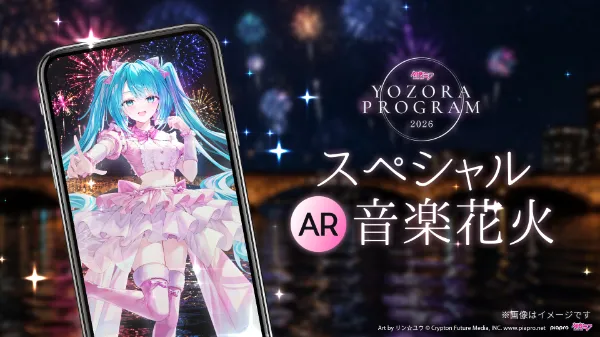
1. Download the AR smartphone app “HoloModels” from the app store.
*The app is free of charge.

Network congestion is expected on the day of the event, so please make sure to download the app in advance.
Do not attempt to download it at the venue.
2. Make sure to launch the app in AR Trial Mode beforehand to check if it works properly.
Please follow the steps below to launch AR Trial Mode and make sure the app runs properly in advance.
① Launch the HoloModels app.


※開発中の画像です
② Select “Location Mode.”


③ When selecting the mode for the first time, a dialog will appear requesting access to your location.
If you do not grant permission, Location Mode cannot be used.
■ About Location Accuracy
You can choose between “Precise” and “Approximate” location. Please select “Precise Location”.
■ About Permission Settings
For Android:
Select either “Allow only while using the app” or “Only this time”.
For iOS:
Select either “Allow Once” or “Allow While Using the App”.

※開発中の画像です
④ Select “AR Trial Mode” and tap OK to begin the download.
⑤ After the download is complete, please check that the content displays properly.
⑥ After confirming with AR Trial Mode, select “Yozora Program Special AR Music Fireworks” and download the main content in advance.

※開発中の画像です

※開発中の画像です
Once the download is complete and you see the message “This event is under preparation,” your app setup is finished!
We hope you enjoy the event!
3. Please check the fireworks schedule, program, and designated viewing areas for special AR effects, and prepare accordingly.
*Please note that the special AR effects will not be visible outside the designated area.*
Event Date & Time: September 15 (Mon, public holiday) from around 7:45 PM (JST)
AR Music Fireworks Viewing Area: Around the Central Cascade Plaza inside Suntopia World


Things to Do Before the Event Day
1. Prepare the AR smartphone app “HoloModels.”
① Launch the HoloModels app.
※開発中の画像です
② Select “Location Mode.”

※開発中の画像です
③ Select “Hatsune Miku YOZORA PROGRAM 2025 Special AR Music Fireworks,” which will be marked as ongoing, and tap OK.
*If you haven’t downloaded the content in advance, the download will begin at this point. Please make sure to complete the download beforehand.*
To view the special fireworks performance featuring Hatsune Miku, please face the AR Collaboration Fireworks launch area.
Note that the performance will not be visible outside the designated area.
*Please note that there may be slight discrepancies depending on your device.*
If you launch the app just seconds before the start, it may not be ready in time.
Please have the start button displayed and be fully prepared a few minutes before the fireworks begin.
2. Hatsune Miku’s Lines at the Venue

“3, 2, 1... Start!”
Then tap the Start button on the screen.

※開発中の画像です

※開発中の画像です
3. Enjoy the special AR effects in sync with the fireworks!
* If the position is misaligned, you can reposition it anytime using the “Position” button.
* Tap the “Display” button to hide the on-screen buttons—perfect for taking photos.

※開発中の画像です
Things to Do on the Event Day
*In case you are unable to experience the AR content*
If, due to device compatibility or network conditions, you are unable to experience the AR content, a video featuring the AR performance will be available approximately one week later on Gugenka’s official YouTube channel.
Please enjoy the experience there instead.
Gugenka Official YouTube Channel
*Be sure to subscribe to the channel and check it out.*
Other Important Notes
* Please enjoy the AR experience considerately and respectfully toward other visitors. Avoid any behavior that may disturb those around you.
* Event dates, content, and other details are subject to change, postponement, or cancellation without prior notice due to unforeseen circumstances.
* For information on compatible devices for “HoloModels,” please refer to the respective app stores.
* On the day of the event, network conditions may be unstable. Depending on your environment, the AR app may not function properly.
* We are not responsible for any viewing issues related to this AR event, or for any trouble or accidents that may occur at the venue.

Events & Attractions
YOZORA PROGRAM Special AR Music Fireworks
HATSUNE MIKU YOZORA PARTY 2025 produced by Digital Stars
YOZORA PROGRAM Music Video Screening
Magical Ferris Wheel of the Starry Sky
instax™ "Cheki" presents Hatsune Miku Special Greeting
YOZORA PROGRAM Illustration Contest
Digital “Piapro Wall”
Dayo Greeting
Starry Sky Merry-Go-Round
Hatsune Miku YOZORA PROGRAM Special Talk Stage
Starry Sky Academy Picks: Recommended Photo Spots
Hatsune Miku YOZORA PROGRAM × famimaPRINT
YOZORA PROGRAM × and ST
Hatsune Miku Special Photo Booth
Stamp Rally Garapon Lottery
XREAL Collaboration Campaigns
Contact
For inquiries about “Hatsune Miku YOZORA PROGRAM,” please contact Gugenka Inc.
Art by うなさか © Crypton Future Media, INC. www.piapro.net

©Gugenka®